ભારતમાં ગેમિંગ એપમાં ખરીદી: રિફંડ, પેરેન્ટલ કંટ્રોલ અને રસીદ ચેકલિસ્ટ
ગેમિંગ એપ ઇન-એપ ખરીદીઓ, રસીદ રેકોર્ડ, પેરેન્ટલ કંટ્રોલ, રિફંડ વિનંતીઓ, અને ગ્રાહક ઉછાળવા માટેનું પ્રાયોગિક ભારત-કેન્દ્રિત ચેકલિસ્ટ.
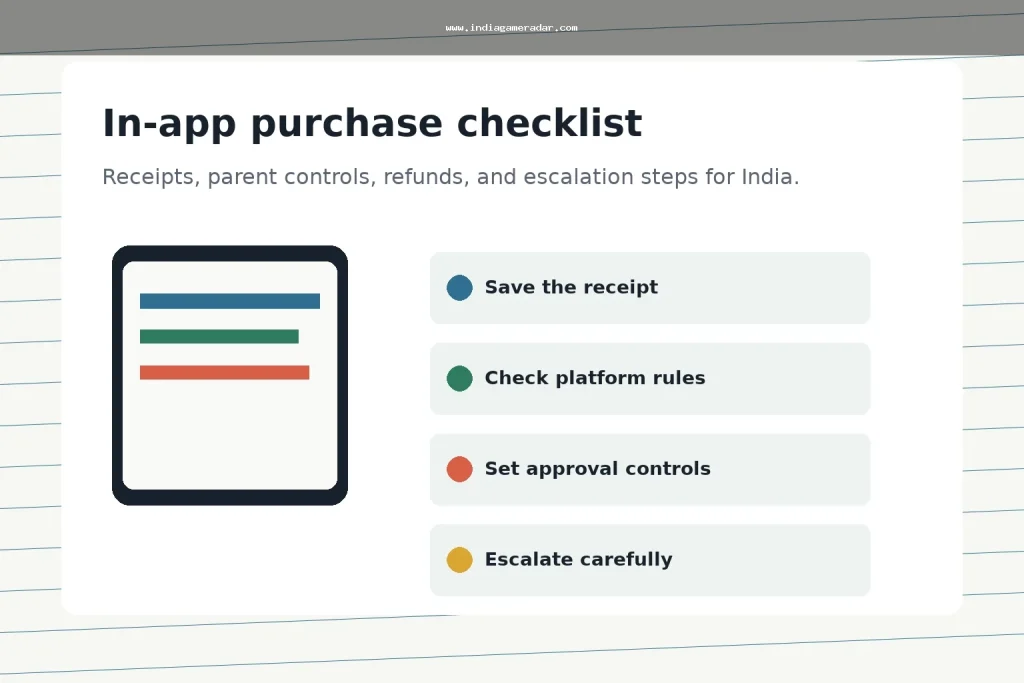
In-app purchases are easy to miss until a receipt arrives. For gaming apps, the safest approach is to treat every coin pack, season pass, subscription, battle pass, and add-on as a small payment record that needs approval, a receipt, and a clear refund path. This India-focused checklist is for players and parents who want to reduce accidental charges and keep useful evidence if a purchase dispute has to be raised later.
India Game Radar does not process deposits, purchases, refunds, wallet withdrawals, or gaming accounts. Use this as an independent record-keeping and platform-support checklist, not legal or payment advice. Refund decisions still depend on the app store, developer policy, account history, purchase timing, and the facts of the case.
ઝડપી ચુકાદો
If a gaming app charge looks wrong, start with the store receipt, the order ID, the account that made the purchase, the payment method, and screenshots of the item shown in the app. Google Play says refund eligibility for apps, games, and in-app purchases can depend on how long it has been since the purchase, with a possible request route within 48 hours and developer contact after that in many cases. Apple says some App Store purchases may be eligible for a refund and points users to its refund request flow, with an update usually taking 24 to 48 hours.
For a broader refund escalation path, keep this article beside our gaming app refunds checklist, transaction records checklist, અને UPI AutoPay cancellation checklist.
Before Any Purchase, Make The Payment Visible
The best refund file is the one you never need. Before a child or another family member uses a gaming device, review purchase verification, family payment settings, and device lock settings. On Google Play, purchase verification and purchase approvals can help reduce unintended purchases. On Apple devices, Family Sharing with Ask to Buy can require a parent or organiser to approve eligible App Store downloads and in-app purchases.
- Use a separate child or family account instead of sharing the main payment account.
- Turn on store-level purchase verification before adding a saved card, UPI, wallet, or carrier billing method.
- Check whether the app has subscriptions, recurring passes, auto-renewing memberships, or one-time consumables.
- Take screenshots of price screens, bonus promises, expiry timers, and important terms before buying.
- Review recent receipts weekly if a child plays games with in-app purchases enabled.

What To Save When A Charge Happens
Do not begin with a long complaint. Begin with a clean purchase file. Store-support teams and developers usually need the same basic facts: purchase date, order ID, amount, currency, account email or player ID, app name, item name, and the exact reason the purchase is disputed. Keep screenshots of the in-app item, the payment receipt, the refund request, and any developer replies.
If the issue involves a child, accidental tap, misleading bonus screen, missing item, duplicate charge, or subscription renewal, write that in plain language. Avoid unsupported claims such as fraud, scam, illegal app, or guaranteed refund unless you have direct evidence. Strong evidence is specific: a receipt number, a screenshot, a timestamp, and a support ticket reference.
Use The Store Refund Route First
For Android purchases, start with the relevant Google Play refund policy and request flow for apps, games, and in-app purchases. Use Google Play’s in-app purchase refund guidance to understand the timing and developer-contact limits before you write the request. For Apple purchases, use Apple’s refund request page and select the purchase from the Apple account that received the receipt.
If the purchase happened inside a game but the receipt came from the app store, use the app store route first. If the store asks you to contact the developer, send a short ticket with the receipt, app version, player ID, and screenshots. Keep the developer’s reply, because it becomes useful evidence if the matter later has to be escalated.

Escalate Only After The Basic Record Is Ready
If the store and developer do not resolve a consumer purchase issue, Indian users can keep a compact complaint record before using a public escalation channel. The નેશનલ કન્સ્યુમર હેલ્પલાઇન lists contact options including the web portal, call centre 1915, WhatsApp, SMS, and app routes. Use the same facts you already saved: receipt, order ID, app name, developer response, amount, date, and the outcome you are requesting.
Escalation should not be a first reaction to every failed refund. If the item was delivered and the purchase was intentional, the platform or developer may still deny the refund. If the app screen was misleading, the charge was duplicated, the purchased item never appeared, or a child bypassed weak controls, explain that precisely and attach evidence.
Parent Controls To Recheck Monthly
Parent controls are not a one-time setting. Recheck them after a new device, app reinstall, payment-method change, family-group change, or operating-system update. Review whether the child can install apps, make in-app purchases, accept friend requests, join voice or chat features, or see high-pressure purchase prompts. A PIB Ministry of Education advisory has warned parents and teachers about online gaming risks, including pressure around in-app purchases, so the practical goal is to make spending deliberate rather than hidden.
- Keep the payment method on the parent account, not the child’s game account.
- Require a password, biometric confirmation, or family approval for purchases.
- Remove saved payment methods from shared devices that are used mainly for games.
- Check app-store receipts after weekends, holidays, and tournament events.
- Keep refund expectations realistic and focus the request on evidence.
A Simple Evidence Template
Use one note per disputed charge. Record the app name, player ID, store account, purchase date, order ID, amount, payment method, item name, refund reason, screenshots saved, store request number, developer ticket number, and final response. This structure keeps the complaint clear even if you need to move from store support to developer support and then to a consumer helpline.
ઉદ્દેશ દરેક ચાર્જને પુનઃપ્રાપ્ય બનાવવાનો નથી. ઉદ્દેશ પરિવારના ખરીદોને દૃશ્યમાન બનાવવો, પુનરાવૃત્તિની ભૂલોને રોકવું, અને સપોર્ટ ટીમોને કેસને ઝડપથી સમીક્ષા કરવા માટે પૂરતા તથ્યો આપવાનો છે.
નં. રિફંડની યોગ્યતા એપ સ્ટોર, ખરીદીનો સમય, ડેવલપરની નીતિ, ખાતાની ઇતિહાસ અને વિનંતીનો કારણ પર આધાર રાખે છે. રિફંડને સમીક્ષા આધારિત માનવામાં આવવું જોઈએ, ખાતરી આપેલ નથી.
દુકાનની રસીદ, ઓર્ડર આઈડી, તારીખ, રકમ, એપ્લિકેશનનું નામ, વસ્તુનું નામ, ઉપયોગમાં લેવાયેલ ખાતું, ખરીદીની સ્ક્રીનશોટ અને કોઈપણ ડેવલપર અથવા દુકાનના સપોર્ટના જવાબોને સાચવો.
શેર કરેલા ગેમિંગ ડિવાઇસ પર સાચવેલા ચુકવણી પદ્ધતિઓને ટાળવું ઘણીવાર વધુ સુરક્ષિત હોય છે. જો ચુકવણી પદ્ધતિ સક્રિય રહેવી જોઈએ, તો ખરીદીની પુષ્ટિ, પરિવારની મંજૂરી અને નિયમિત રસીદની તપાસનો ઉપયોગ કરો.
તેનો ઉપયોગ ત્યારે કરો જ્યારે તમારી પાસે સ્પષ્ટ ગ્રાહક ફરિયાદનો રેકોર્ડ હોય અને સ્ટોર અથવા ડેવલપર સપોર્ટે સમસ્યાનું ઉકેલ ન કર્યું હોય. રસીદ, ઓર્ડર ID, સપોર્ટ સંદર્ભો અને વિનંતી કરેલ પરિણામ તૈયાર રાખો.
લખ્યું છે
રોહન આયર
બ્રાન્ડ સંશોધન સંપાદક
રોહન આયર ઓનલાઇન BC બ્રાન્ડ પ્રોફાઇલ, એપ ઉપલબ્ધતા, જાહેર શરતો, ગ્રાહક સપોર્ટ નોંધો અને ભારત ગેમ રેડાર માટે બજાર અપડેટ્સનું સંશોધન કરે છે. તેમનું કાર્ય જાહેર સ્ત્રોત ચકાસણીઓ અને અસ્વસ્થતાનું સ્પષ્ટ પ્રદર્શન પ્રાથમિકતા આપે છે.
- નિષ્ણાત
- બ્રાન્ડ પ્રોફાઇલ, બેટિંગ એપ સંશોધન, જાહેર શરતો, સપોર્ટ નોંધો, બજાર અપડેટ્સ, અને સહયોગી ખુલાસા સંદર્ભ.
- સમીક્ષા વ્યાપકતા
- બ્રાન્ડ પ્રોફાઇલ, જાહેર એપ માહિતી, બજાર અપડેટ્સ, સહયોગી ખુલાસા, અને સ્ત્રોત આધારિત સુધારાઓની સમીક્ષા કરે છે.