ಭಾರತದಲ್ಲಿ ಆಟಗಳ ಅಪ್ಲಿಕೇಶನ್ಗಳಿಗೆ APK ಡೌನ್ಲೋಡ್ ಸುರಕ್ಷತೆ: ಸ್ಥಾಪನಾ ಪರಿಶೀಲನೆ
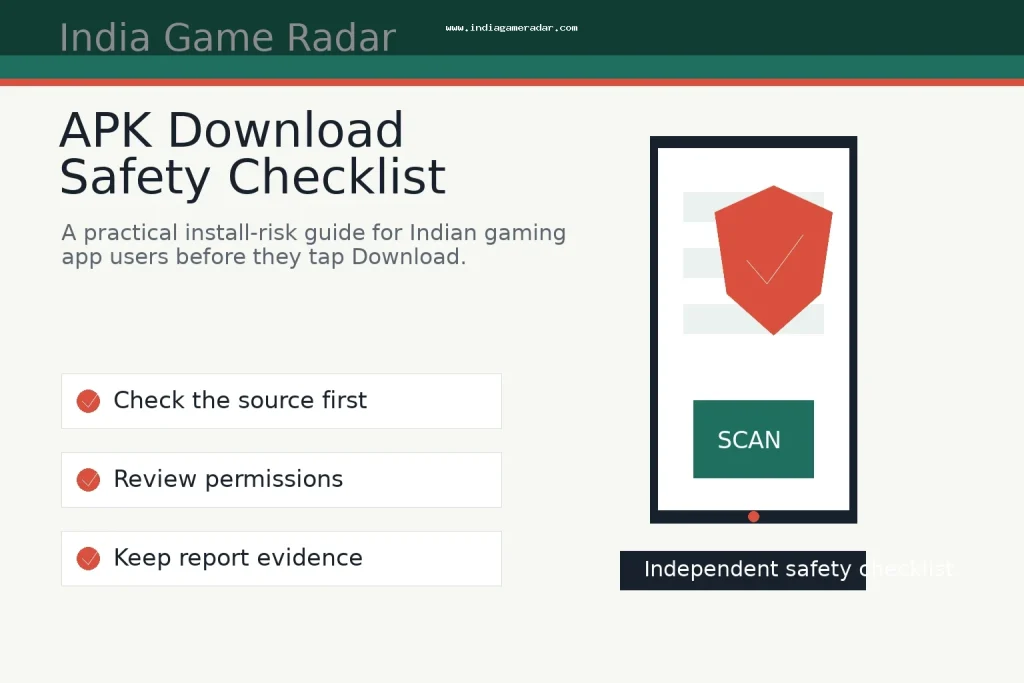
APK files and direct-download gaming links deserve a separate safety check. A polished download page, a bonus promise, or a forwarded install link does not prove that the app is safe, current, legal in every Indian state, or connected to the operator it claims to represent. India Game Radar is an independent information site; we do not accept deposits, process withdrawals, manage player accounts, or provide access to real-money gaming. Use this checklist before installing a gaming app from an APK, a direct website download, a store listing, or a social-media link.

Start With The Source, Not The Bonus
The first question is not whether the app looks exciting. It is where the file came from. Prefer the operator’s official domain, a known app store listing, or a documented download route that matches the brand’s own website. Be cautious with shortened links, copied APK mirrors, Telegram forwards, comment-section links, and pages that only talk about bonus money. If a link claims urgency, says an older app is “blocked,” or asks you to install an unknown update outside the normal path, compare it with the warning signs in our ನಕಲಿ ಆಟದ ಅಪ್ಲಿಕೇಶನ್ ಮೋಸ ಚೆಕ್ಲಿಸ್ಟ್.
Google says Play Protect checks apps from Google Play before download and can also check a device for potentially harmful apps from other sources. That is useful, but it is not a guarantee. Treat a Play Protect warning as a stop signal, and treat a clean scan as only one part of the decision. You still need to read the source, permissions, account prompts, payment route, and complaint process.
Check Permissions Before You Log In
A gaming app normally needs some device access, but the permission request should match what the app actually does. Be more careful if an APK asks for SMS access, contacts, accessibility services, notification reading, screen overlay, call logs, files that are not needed for gameplay, or permission changes before it explains why. Google’s own developer policy material treats permissions and APIs that access sensitive information as a privacy and compliance area, so players should treat unusual permission prompts as a practical risk signal.
Also read the app’s privacy and data disclosures before entering a phone number, email, Aadhaar-related document, PAN, UPI details, or wallet information. Our ಆಟದ ಅಪ್ಲಿಕೇಶನ್ ಡೇಟಾ ಸುರಕ್ಷತೆ ಚೆಕ್ಲಿಸ್ಟ್ explains the broader privacy review. For APK decisions, the key rule is simpler: if the app wants sensitive data before you can inspect terms, limits, support, or deletion options, slow down.
Use A Five-Minute Install Checklist
- Confirm that the download link is on the operator’s official website or a trusted app-store page.
- Search the exact app name and developer name, not only the advertised brand name.
- Check whether the app explains eligibility, state restrictions, paid-contest rules, KYC, withdrawals, and support before asking for money.
- Read the permission screen and reject permissions that do not fit the app’s stated use.
- Do not enter an OTP, UPI PIN, card PIN, or password because a support agent, bonus page, or update prompt asks for it.
- Keep screenshots of the source page, version number, file name, payment request, and support conversation if anything looks wrong.
This checklist is deliberately boring. That is the point. Most risky installs rely on speed: a limited-time reward, a copied download link, a fake support message, or a claim that the “real” app is no longer in the store. A safe decision usually survives a few minutes of checking.

If You Already Installed A Suspicious APK
ಅಪ್ಲಿಕೇಶನ್ ಅನ್ನು “ಏನು ಸಂಭವಿಸುತ್ತದೆ” ಎಂದು ನೋಡಲು ಪ್ರಯೋಗಿಸುತ್ತಿರುವುದನ್ನು ನಿಲ್ಲಿಸಿ. ಪ್ರಮಾಣಪತ್ರಗಳು, ಪಾವತಿ ವಿವರಗಳು, ಓಟಿಪಿಗಳು ಮತ್ತು ಗುರುತಿನ ದಾಖಲೆಗಳನ್ನು ನಮೂದಿಸುವುದನ್ನು ನಿಲ್ಲಿಸಿ. ಮೊದಲಿಗೆ ಸಾಕ್ಷಿಗಳನ್ನು ಉಳಿಸಿ: ಡೌನ್ಲೋಡ್ URL, ಅಪ್ಲಿಕೇಶನ್ ಐಕಾನ್, ಪ್ಯಾಕೇಜ್ ಹೆಸರು ದೃಶ್ಯಮಾನವಾದರೆ, APK ಫೈಲ್ ಹೆಸರು, ಅನುಮತಿ ಪ್ರಾಂಪ್ಟ್ಗಳ ಸ್ಕ್ರೀನ್ಶಾಟ್ಗಳು, ಪಾವತಿ ವಿನಂತಿಗಳು, ಬೆಂಬಲ ಚಾಟ್ಗಳು ಮತ್ತು ವ್ಯವಹಾರ IDಗಳು. ನಂತರ ಅಪಾಯಕರ ಅನುಮತಿಗಳನ್ನು ತೆಗೆದು ಹಾಕಿ, ಅಗತ್ಯವಿದ್ದರೆ ಅಪ್ಲಿಕೇಶನ್ ಅನ್ನು ಅನ್ಇನ್ಸ್ಟಾಲ್ ಮಾಡಿ, ಪುನಃ ಬಳಸುವ ಪಾಸ್ವರ್ಡ್ಗಳನ್ನು ಬದಲಾಯಿಸಿ ಮತ್ತು ಲಿಂಕ್ ಮಾಡಿದ ಪಾವತಿ ಖಾತೆಗಳನ್ನು ಗಮನಿಸಿ.
ಸಮಸ್ಯೆ ಗ್ರಾಹಕ-ಸೇವಾ ದೂರುವಾಗಿದ್ದರೆ, ರಾಷ್ಟ್ರೀಯ ಗ್ರಾಹಕ ಹೆಲ್ಪ್ಲೈನ್ ದೂರುಗಳನ್ನು ನೋಂದಾಯಿಸಲು ಮತ್ತು ಟ್ರ್ಯಾಕ್ ಮಾಡಲು ಮತ್ತು ದಾಖಲೆಗಳನ್ನು ಅಪ್ಲೋಡ್ ಮಾಡಲು ಅಧಿಕೃತ ಮಾರ್ಗಗಳನ್ನು ಒದಗಿಸುತ್ತದೆ. ಸಮಸ್ಯೆ ಸೈಬರ್ ಮೋಸ, ನಕಲಿ ವ್ಯಕ್ತಿತ್ವ, ಖಾತೆ ಕಬಳಿಸುವಿಕೆ ಅಥವಾ ಹಣಕಾಸು ಅಪರಾಧದಂತೆ ಕಾಣುತ್ತಿದ್ದರೆ, ರಾಷ್ಟ್ರೀಯ ಸೈಬರ್ ಕ್ರೈಮ್ ವರದಿ ಪೋರ್ಟಲ್. ಅನ್ನು ಬಳಸಿರಿ. ಯಾವುದೇ ಮಾರ್ಗವು ಪುನಃ ಪಡೆಯುವಿಕೆಯನ್ನು ಖಾತರಿಯಲ್ಲ, ಆದರೆ ಇಬ್ಬರೂ ಶಂಕಿತ “ಬೆಂಬಲ” ಖಾತೆಯೊಂದಿಗೆ ಖಾಸಗಿ ಚಾಟ್ ಮುಂದುವರಿಸುವುದಕ್ಕಿಂತ ಉತ್ತಮವಾಗಿದೆ. ಪಾವತಿ-ನಿರ್ದಿಷ್ಟ ಸಾಕ್ಷಿಗಾಗಿ, ನಮ್ಮಲ್ಲಿ ಶಿಫಾರಸು ಮಾಡಿದ ದಾಖಲೆಗಳನ್ನು ಹೋಲಿಸಿ UPI ಪಾವತಿ ಸುರಕ್ಷತೆ ಚೆಕ್ಲಿಸ್ಟ್.
ಈ ಚೆಕ್ಲಿಸ್ಟ್ ಏನು ಸಾಬೀತುಪಡಿಸಲು ಸಾಧ್ಯವಿಲ್ಲ
ಸಾರ್ವಜನಿಕ ಚೆಕ್ಲಿಸ್ಟ್ಗಳು ಭಾರತದಲ್ಲಿ ಪ್ರತಿಯೊಂದು ಆಡುವ ಅಪ್ಲಿಕೇಶನ್ ಸುರಕ್ಷಿತ, ಅನುಮೋದಿತ, ಸಾಲದ, ನ್ಯಾಯಸಮ್ಮತ ಅಥವಾ ಎಲ್ಲೆಡೆ ಲಭ್ಯವಿದೆ ಎಂದು ಸಾಬೀತುಪಡಿಸಲು ಸಾಧ್ಯವಿಲ್ಲ. ಅಪ್ಲಿಕೇಶನ್ ವರ್ತನೆ ಅಪ್ಡೇಟ್ಗಳ ನಂತರ ಬದಲಾಗಬಹುದು, ರಾಜ್ಯ ನಿಯಮಗಳು ಬದಲಾಗಬಹುದು ಮತ್ತು ಪಾವತಿ ಅಥವಾ ಬೆಂಬಲ ಪ್ರಕ್ರಿಯೆಗಳು ಬಳಕೆದಾರ ಮತ್ತು ಉತ್ಪನ್ನದ ಮೂಲಕ ಬದಲಾಗಬಹುದು. ಸ್ಪಷ್ಟ ಇನ್ಸ್ಟಾಲ್ ಅಪಾಯವನ್ನು ಕಡಿಮೆ ಮಾಡಲು ಚೆಕ್ಲಿಸ್ಟ್ ಅನ್ನು ಬಳಸಿರಿ, ನಂತರ ಖಾತೆ ಅಥವಾ ಪಾವತಿ ನಿರ್ಧಾರಗಳನ್ನು ತೆಗೆದುಕೊಳ್ಳುವ ಮೊದಲು ಅಪ್ಲಿಕೇಶನ್ನ ಶರತ್ತುಗಳು, ಗೌಪ್ಯತಾ ನೀತಿ, ಜವಾಬ್ದಾರಿ-ಆಟದ ಸಾಮಾನು ಮತ್ತು ದೂರು ಪ್ರಕ್ರಿಯೆಯನ್ನು ಓದಿ.
ಇಲ್ಲ. ಕೆಲವು ಆಪರೇಟರ್ಗಳು ನೇರ ಡೌನ್ಲೋಡ್ಗಳನ್ನು ಬಳಸುತ್ತವೆ, ಆದರೆ ನೇರ APK ಸ್ಪಷ್ಟವಾಗಿ ದಾಖಲೆಗೊಳಿಸಲಾದ ಅಂಗಡಿ ಅಥವಾ ಅಧಿಕೃತ-ಸೈಟ್ ಮಾರ್ಗಕ್ಕಿಂತ ಹೆಚ್ಚು ಅಪಾಯವಾಗಿದೆ. ಸ್ಥಾಪನೆಯ ಮೊದಲು ಮೂಲ, ಅಭಿವೃದ್ಧಿಕಾರರ ಗುರುತಿನ, ಅನುಮತಿಗಳು, ಶರತ್ತುಗಳು ಮತ್ತು ಸ್ಕ್ಯಾನರ್ ಎಚ್ಚರಿಕೆಗಳನ್ನು ಪರಿಶೀಲಿಸಿ.
ಇಲ್ಲ. ಪ್ಲೇ ಪ್ರೊಟೆಕ್ಟ್ ಒಂದು ಉಪಯುಕ್ತ ಸುರಕ್ಷತಾ ಹಂತವಾಗಿದೆ ಮತ್ತು ಸಾಧ್ಯವಾದಷ್ಟು ಹಾನಿಕಾರಕ ಆಪ್ಗಳ ಬಗ್ಗೆ ಎಚ್ಚರಿಕೆ ನೀಡಬಹುದು, ಆದರೆ ಇದು ಖಾತರಿಯಲ್ಲ. ಮೂಲ, ಅನುಮತಿಗಳು, ಗೌಪ್ಯತೆ, ಪಾವತಿ ಮತ್ತು ಬೆಂಬಲ ವಿಮರ್ಶೆಯೊಂದಿಗೆ ಇದನ್ನು ಒಂದು ಪರಿಶೀಲನೆಯಂತೆ ಪರಿಗಣಿಸಿ.
ಪುಟ ಅಥವಾ ಬೆಂಬಲ ಸಂದೇಶವು ಬೋನಸ್ ಅನ್ನು ಭರವಸೆ ನೀಡುತ್ತದೆ ಎಂಬ ಕಾರಣಕ್ಕೆ ಮಾತ್ರ ಸ್ಥಾಪಿಸಬೇಡಿ. ಮೊದಲು ಮೂಲವನ್ನು ದೃಢೀಕರಿಸಿ, ಶರತ್ತುಗಳನ್ನು ಓದಿ, ಅನುಮತಿಗಳನ್ನು ಪರಿಶೀಲಿಸಿ, ಮತ್ತು ಒಪ್ಪಂದದ ಸಂಖ್ಯೆಗಳು, ಪಾಸ್ವರ್ಡ್ಗಳು, ಯುಪಿಐ ಪಿನ್ಗಳು ಅಥವಾ ಕಾರ್ಡ್ ಪಿನ್ಗಳನ್ನು ಹಂಚಿಕೊಳ್ಳಬೇಡಿ.
ಸಮಸ್ಯೆ ಸೈಬರ್ ಮೋಸ ಅಥವಾ ಹಣಕಾಸು ಅಪರಾಧದಂತೆ ಕಾಣುತ್ತಿದ್ದರೆ, ರಾಷ್ಟ್ರೀಯ ಸೈಬರ್ ಅಪರಾಧ ವರದಿ ಪೋರ್ಟಲ್ ಅನ್ನು ಬಳಸಿರಿ. ಇದು ಗ್ರಾಹಕ-ಸೇವಾ ದೂರುವಾಗಿದ್ದರೆ, ರಾಷ್ಟ್ರೀಯ ಗ್ರಾಹಕ ಹೆಲ್ಪ್ಲೈನ್ ಸಂಬಂಧಿತವಾಗಿರಬಹುದು. ಸ್ಕ್ರೀನ್ಶಾಟ್ಗಳು, URLs, ವ್ಯವಹಾರ IDಗಳು ಮತ್ತು ಬೆಂಬಲ-ಚಾಟ್ ದಾಖಲೆಗಳನ್ನು ಉಳಿಸಿ.
ಬರೆಯಲಾಗಿದೆ
ಆರವ್ ಮೆಹ್ತಾ
ಹಿರಿಯ ಬೆಟ್ಟಿಂಗ್ ಆಟಗಳ ಸಂಪಾದಕ
ಆರವ್ ಮೆಹ್ತಾ ಆಟದ ನಿಯಮಗಳ ವಿವರಗಳು, ಫ್ಯಾಂಟಸಿ ಕ್ರೀಡಾ ಮಾರ್ಗದರ್ಶಿಗಳು, ಕ್ರಿಕೆಟ್ ಬೆಟ್ಟಿಂಗ್ ಹಿನ್ನೆಲೆ ಮತ್ತು ಭಾರತೀಯ ವಯಸ್ಕ ಓದುಗರಿಗಾಗಿ ತಂತ್ರಜ್ಞಾನ ಟಿಪ್ಪಣಿಗಳನ್ನು ಬರೆಯುತ್ತಾನೆ ಮತ್ತು ವಿಮರ್ಶಿಸುತ್ತಾನೆ. ಅವರ ಕೆಲಸವು ನಿಯಮಗಳು, ಅಪಾಯ, ಮಿತಿಗಳು ಮತ್ತು ಸಾರ್ವಜನಿಕ ವೇದಿಕೆ ನಿಯಮಗಳನ್ನು ಸ್ಪಷ್ಟ ಭಾಷೆಯಲ್ಲಿ ವಿವರಿಸಲು ಕೇಂದ್ರೀಕೃತವಾಗಿದೆ.
- ಪರಿಣತಿ
- ಕ್ರಿಕೆಟ್ ಬೆಟ್ಟಿಂಗ್ ಹಿನ್ನೆಲೆ, ಫ್ಯಾಂಟಸಿ ಕ್ರೀಡಾ ನಿಯಮಗಳು, ಕ್ಯಾಸಿನೋ ಆಟಗಳ ವಿವರಗಳು, ಬೆಟ್ಟಿಂಗ್ ತಂತ್ರದ ಮೂಲಗಳು ಮತ್ತು ಜವಾಬ್ದಾರಿಯುತ ಬಳಕೆಯ ನೆನಪಿನ ಸೂಚನೆಗಳು.
- ವಿಮರ್ಶಾ ವ್ಯಾಪ್ತಿ
- ಪ್ರಕಟಣೆಗೆ ಮುನ್ನ ಆಟದ ನಿಯಮಗಳು, ತಂತ್ರಗಳು, ಬೋನಸ್-ಶರತ್ತು ವಿವರಗಳು ಮತ್ತು ಸಾರ್ವಜನಿಕ ಮೂಲದ ನವೀಕರಣಗಳನ್ನು ಪರಿಶೀಲಿಸುತ್ತದೆ.