UPI Payment Safety for Gaming Apps in India: A Player Checklist
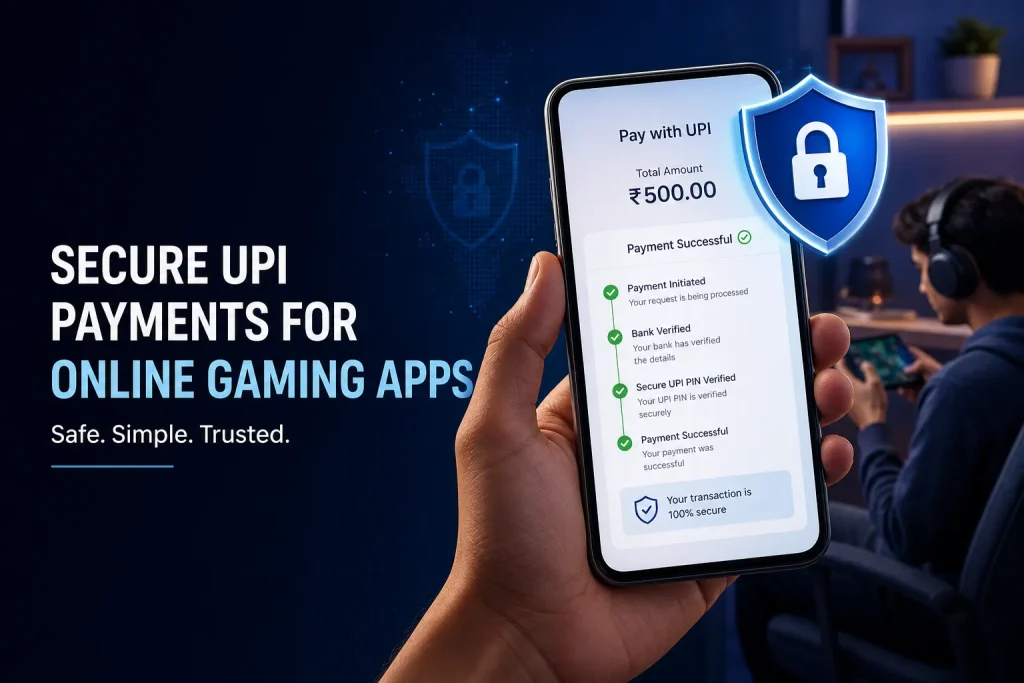
UPI makes deposits and withdrawals feel instant, but gaming and betting payments still need a slower safety check. A real-money app can look polished and still leave you exposed if its payment flow hides the merchant name, asks for unusual permissions, or pushes you to act before you can verify the transaction.
This guide is for adult readers comparing payment flows on gaming apps in India. India Game Radar is an independent information site. We do not operate gaming services, accept deposits, process withdrawals, or manage player accounts.
The quick UPI safety checklist

- Check the app or merchant name before approving any UPI payment.
- Use your UPI PIN only when you are sending money. Do not enter it to receive money, unlock a bonus, or verify an account.
- Do not share OTPs, UPI PINs, card details, passwords, or screen-sharing access with support agents, tipsters, Telegram groups, or callers.
- Keep a record of the transaction ID, amount, date, app name, and bank account used.
- Use the official app dispute flow, your bank, NPCI UPI Help, or the National Cyber Crime Reporting Portal if something looks wrong.
Why gaming payments need extra care
NPCI describes UPI as an instant payment system built for real-time transfers between bank accounts. That speed is useful, but it also means you should treat every payment approval as final until your bank, UPI app, or dispute channel confirms otherwise.
Gaming apps add extra decision pressure: limited-time contests, bonus popups, withdrawal countdowns, and support chats can make a payment feel urgent. Slow down when the payment screen appears. If the beneficiary, merchant name, amount, or purpose does not match what you expected, stop and verify before entering your PIN.
What to check before a deposit
Before sending money to a gaming app, check the payment journey from the app screen to the UPI approval screen. The app should make it clear which legal entity or payment partner is collecting the amount, what the amount is for, and whether the payment is connected to a bonus or wallet balance.
- Merchant identity: the name on the UPI screen should make sense for the app or payment partner.
- Amount: confirm the exact rupee amount before approval, especially after bonus or tax adjustments.
- Payment purpose: avoid vague requests from personal accounts, unknown VPAs, or QR codes sent outside the app.
- App permissions: a payment flow should not require remote access, SMS forwarding, or screen sharing.
- Terms link: check the app’s wallet, refund, withdrawal, and KYC rules before the first deposit.
For broader context on how India Game Radar evaluates payment and app claims, see our review methodology and transparency pages.
Red flags during withdrawal or support chats
Withdrawals create a different risk: fraudsters often pretend that you must approve a request, scan a QR code, or share a code to receive money. NPCI’s UPI safety guidance is clear that QR scanning is for making payments, not receiving money. RBI’s public digital-safety messaging also warns users not to share sensitive credentials such as OTPs, PINs, CVV, card details, or UPI PINs.
- A support agent asks for your UPI PIN, OTP, card number, CVV, banking password, or device password.
- You are told to approve a collect request to “release” a withdrawal.
- You are asked to install a screen-sharing, remote-access, or SMS-forwarding app.
- The app redirects you to a personal account, unofficial Telegram group, or unrelated merchant.
- The withdrawal rule changes only after you win, request cashout, or complete KYC.
What records to keep

Good records help if you need to raise a dispute. Save the UPI transaction ID or UTR, date, time, amount, app name, merchant name, screenshots of the payment screen, wallet ledger, withdrawal request, and support conversation. Do not edit screenshots before sharing them with your bank, UPI app, or a formal complaint channel.
Also keep copies of the app’s wallet terms and any bonus conditions that affected the transaction. Many disputes are not only technical payment failures; they can involve wagering requirements, KYC holds, refund rules, or account restrictions.
Where to report payment trouble
Start with the channel closest to the transaction: the UPI app, your bank, or the gaming app’s official support route. NPCI also provides UPI Help for failed payments and UPI-related complaints. For suspected cyber financial fraud, government portals point users to the National Cyber Crime Reporting Portal and helpline 1930.
- Failed or pending UPI transaction: check your UPI app and bank first, then use NPCI UPI Help if needed.
- Unauthorised or suspicious transaction: contact your bank immediately and preserve evidence.
- Cyber financial fraud: report quickly through 1930 or cybercrime.gov.in.
- Consumer grievance: the National Consumer Helpline lists cyber financial fraud routing and other complaint portals.
If the issue involves a gaming app’s conduct rather than a pure payment failure, use the app’s official complaint channel and keep a clear timeline. You can also use India Game Radar’s Report an Issue page to flag information we should review editorially. We cannot recover funds or act for a gaming operator.
A safer habit for every gaming payment
Treat UPI approval as a separate decision from playing a game. The app may be familiar, but the payment screen still deserves its own check: name, amount, purpose, PIN, and record. If anything feels inconsistent, stop before approval and verify through official channels only.
UPI itself is a widely used instant payment system, but safety depends on the app, merchant identity, payment screen, and your own approval behavior. Check the merchant name, amount, and purpose before entering your UPI PIN.
No. A UPI PIN is used to approve sending money. Be cautious if anyone asks you to enter a PIN, scan a QR code, or approve a collect request to receive a withdrawal.
Contact your bank or UPI app immediately, save the transaction ID and screenshots, and report suspected cyber financial fraud through helpline 1930 or cybercrime.gov.in.
Editorial note: This article is general information for adults in India. It is not legal, financial, or recovery advice. Rules, app policies, and payment routes can change, so verify details with official channels before acting.
Written by
Nisha Rao
Payments and Safety Editor
Nisha Rao covers payment notes, KYC guidance, account-safety topics, app usability, and responsible gaming context. She focuses on helping readers understand public information without treating gaming as income or financial advice.
- Expertise
- UPI and wallet notes, KYC explainers, app safety checks, responsible gaming tools, and reader correction review.
- Review scope
- Reviews payment guidance, KYC notes, safety language, responsible-use sections, and correction evidence.