Gaming App Age Ratings in India: Parental Controls and Safety Checklist
India checklist for parents checking gaming app age ratings, parental controls, purchases, chat, ads, privacy, and account safety before children play.
Age ratings and parental controls are useful first checks, but they are not a full safety review. For gaming apps in India, parents and guardians should look at the rating, the reason behind the rating, in-app purchases, chat or multiplayer features, ads, privacy disclosures, and account recovery before a child or teen starts using the app.
This checklist is for families reviewing mobile games, fantasy-style apps, social games, and other gaming apps from public information. India Game Radar is an independent information site. We do not accept deposits, process withdrawals, manage player accounts, provide real-money gaming access, or claim to have tested every app, payment flow, support channel, or parental-control setting mentioned here.
The Short Version
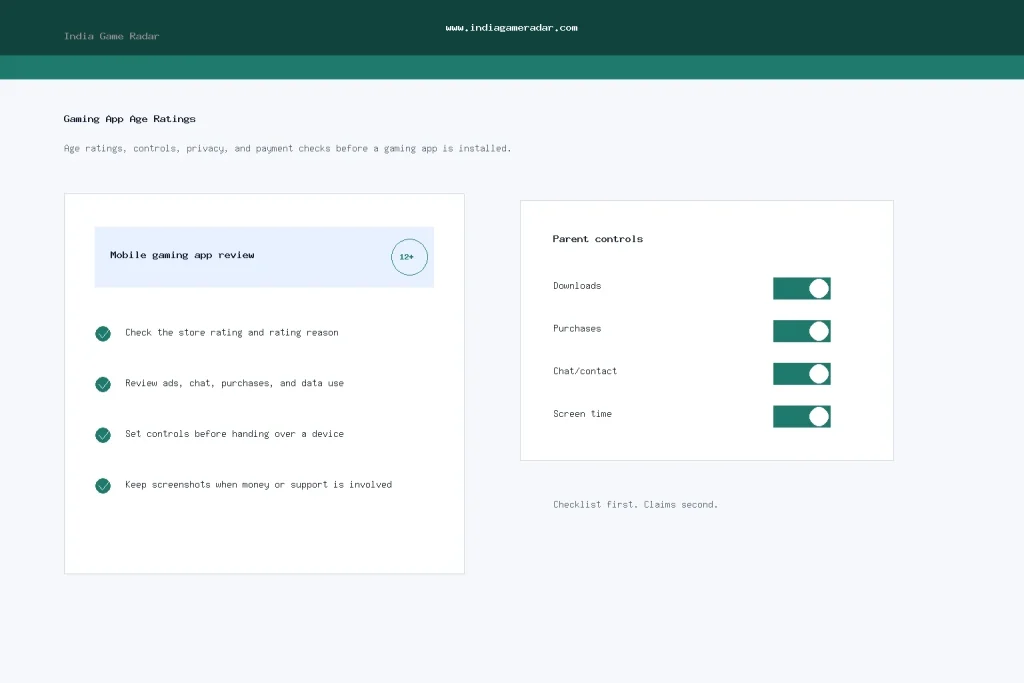
Before installing a gaming app for a child or teen, check three layers. First, read the app-store rating and rating reason. Second, turn on platform controls before the device is handed over. Third, review the app itself for money features, public chat, private messaging, ads, location requests, document requests, and account-deletion options.
- Age rating: Use it as a maturity signal, not a guarantee.
- Controls: Set download, purchase, content, and communication limits at device or store level.
- App review: Check ads, chat, purchases, privacy labels, support routes, and withdrawal or reward wording.
- Records: Keep screenshots of ratings, terms, support messages, and purchases if money or account access is involved.

What App Store Ratings Actually Tell You
Google Play says app and game content ratings are used to inform users about potentially objectionable content and may help block or filter content in certain situations. Its help page also makes an important distinction: ratings describe a minimum maturity level for content, but they do not prove that an app was designed for users of that exact age. Parents should read the rating explanation, not just the number or badge.
Start with the official store page. On Google Play, use the content-rating section and the rating details linked from the app listing. On Apple devices, check the App Store age rating and then pair it with Screen Time settings. If a game has simulated gambling, real-money wording, live chat, user-generated content, aggressive ads, or in-app purchases, treat the app as higher risk even when the headline rating looks moderate.
Official source checks used for this guide include Google Play content ratings, Google Play parental guidance, and Apple parental controls. These are platform-level references, not endorsements of any individual gaming app.
Parental Controls to Set Before the First Session
Controls work best when they are configured before the app is installed. On Android, Google Play parental controls can restrict downloads or purchases by content maturity level. Google’s own parental guide also notes that purchase approval settings apply to purchases made through Google Play billing, so parents should still check whether an app uses other account, wallet, or web-based flows.
On iPhone and iPad, Apple points parents to Screen Time, Family Sharing, a child’s Apple Account, and Content and Privacy Restrictions. Those settings can help manage downloads, purchases, communication, app access, and content access. Apple also notes that some default settings vary by country, region, and age, so do not assume another parent’s setup will match yours.
- Require approval for app downloads and in-app purchases.
- Block apps above the child’s age range or maturity level.
- Limit communication, multiplayer chat, and contact discovery where possible.
- Use screen-time limits for late-night play and repeated sessions.
- Review settings again after major operating-system or app updates.

India-Specific Checks for Gaming Apps
India’s current online-gaming policy discussion puts user safety, responsible gaming, and financial or social risk in focus. That context does not mean every app-store listing is approved, safe, legal in every state, or appropriate for children. It simply makes a careful pre-install review more important.
For India-facing apps, read the app description and terms for age limits, prohibited states, real-money or reward language, wallet references, KYC requests, support routes, responsible-play tools, and account-deletion options. If the app asks for Aadhaar, PAN, bank details, UPI information, contact access, or location access, use the steps in our KYC document safety checklist and gaming app data safety checklist before sharing anything.
Also check whether the app has spending controls, cooling-off tools, self-exclusion tools, and clear support contact details. If a game uses contests, rewards, bonus credits, or wallet balances, review the relevant terms before allowing a child or teen to play. For broader limit-setting, see our responsible play limits guide.
Red Flags Parents Should Not Ignore
- The rating is low, but the screenshots or description show gambling-style chips, betting language, or cash prizes.
- The app encourages private chat, friend invites, public rooms, or contact syncing without clear controls.
- Purchase prompts appear before the player understands the game loop.
- The privacy policy is missing, generic, hard to open, or unrelated to the app name.
- The app asks children to upload identity documents, payment screenshots, or bank information.
- The support route is only a social handle, personal messaging account, or vague email address.
- Reviews repeatedly mention account locks, payment disputes, bonus confusion, or withdrawal delays.
One red flag does not automatically prove an app is unsafe or illegal. It does mean the parent should slow down, check the official terms, and avoid adding payment methods until the risk is understood. For real-money, wallet, reward, or contest apps, keep the child away from the payment and account-verification flow unless an adult has fully reviewed the terms.
A Practical Review Flow
- Search the app name in the official store and confirm the developer name.
- Open the rating details and write down the rating reason, not just the number.
- Read the app description for ads, chat, rewards, purchases, real-money wording, and location or contact features.
- Open the privacy policy, support page, and terms before creating an account.
- Set parental controls, purchase approvals, communication limits, and screen-time limits.
- Install the app only after the adult account and device settings are ready.
- Review the app again after updates, new permissions, or changed reward terms.
If a dispute later happens, screenshots matter. Save the app-store listing, rating details, terms page, payment page, support ticket, email replies, and transaction references. That paper trail is often more useful than a memory of what the app showed on installation day.
Bottom Line
For Indian families, a gaming app age rating should start the review, not end it. Use official store ratings, set device controls, check the app’s own money and privacy features, and keep records when account or payment risk is involved. A game that is fine for one household may be unsuitable for another if it includes chat, ads, purchases, rewards, or personal-data requests that parents have not reviewed.
No. Age ratings are maturity signals based on content factors. They do not prove that a game is safe for every child or that the app has been fully reviewed by India Game Radar.
Not always. Store and device controls can restrict downloads, purchases, content, and communication, but parents should still read the app terms and avoid adding payment methods for child accounts.
No. An app-store listing is not a state-by-state legal opinion or operator approval. Check the app terms, prohibited-state wording, current law context, and your own risk tolerance.
Review settings after major app updates, operating-system updates, new permissions, new reward features, changed payment terms, or any support or account-access problem.
Written by
Aarav Mehta
Senior Betting Games Editor
Aarav Mehta writes and reviews game-rule explainers, fantasy sports guides, cricket betting context, and strategy notes for adult readers in India. His work focuses on explaining rules, risk, limits, and public platform terms in clear language.
- Expertise
- Cricket betting context, fantasy sports rules, casino game explainers, betting strategy basics, and responsible-use reminders.
- Review scope
- Reviews game rules, strategy articles, bonus-term explanations, and public-source updates before publication.