Gaming App Transaction Records in India: UTR, Store Orders, and Evidence Checklist
A gaming app payment problem is easier to review when the evidence is organized before you contact support, your bank, an app store, NPCI Support, or a consumer-help route. This checklist is for Indian players who need a clean transaction trail for a failed payment, missing wallet credit, refund request, subscription charge, or disputed in-app purchase.
India Game Radar is an independent information portal. We do not accept deposits, process withdrawals, manage player accounts, provide KYC support, or give access to real-money gaming. Use this as a records checklist, not as legal, tax, payment, or refund advice.
Start With A Single Evidence Trail
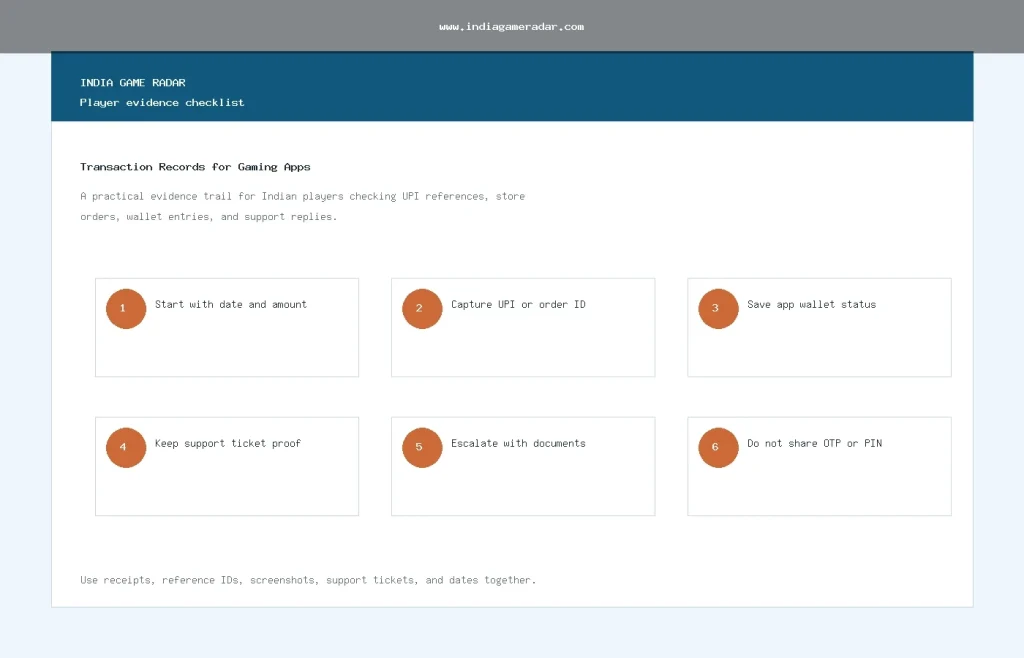
Do not begin with a long complaint message. Begin with a short record pack that can be checked by another person. The core details are the transaction date and time, amount, payment method, app or merchant name, UPI reference number or store order ID, app wallet status, and the support ticket or email thread.
If the issue is a UPI payment, save the reference number from the UPI or bank app and a screenshot showing the final status. If the issue came through an app store, use the platform record instead of relying only on an app wallet screen. Google documents where users can review Google Play order history, while Apple documents purchase history through Apple Support and reportaproblem.apple.com.

Match The Record To The Payment Route
A payment record should match the route used. A UPI transfer, Google Play purchase, Apple App Store purchase, card payment, wallet transfer, and game-wallet entry are not the same evidence source. Save the record from the source that actually handled the transaction.
- UPI or bank app: keep the UPI reference number, bank transaction ID, amount, status, and time. If you later use NPCI Support, keep the ticket number and any response.
- Google Play: check your Google Play order history for paid app or digital-content orders, and note that other Google payment records may sit outside the Play order list.
- Apple App Store: use Apple purchase history or reportaproblem.apple.com to identify the app, amount, and purchase date before asking for help.
- Gaming app wallet: screenshot the in-app ledger, wallet balance, bonus ledger, failed-credit screen, and any status message, but do not treat the wallet screen as the only proof.
This step also helps avoid a common mistake: sending a refund request to the wrong place. For example, an app-store purchase may need the app-store order trail first, while a UPI transfer that never credited may need bank or NPCI evidence first. For broader payment hygiene, read our UPI payment safety checklist for gaming apps.
What To Save Before Contacting Support
| Record | Why it matters | Where to look |
|---|---|---|
| UPI reference or bank transaction ID | Links the payment to a bank or UPI route. | Bank app, UPI app, SMS, email receipt. |
| Google Play or Apple order ID | Shows the app-store purchase trail. | Google Play order history or Apple purchase history. |
| App wallet screenshot | Shows whether the gaming account credited the amount. | Wallet, transaction, bonus, or ledger screen. |
| Support ticket number | Shows that you contacted the app or payment route. | Email, chat, in-app help, NPCI Support, or NCH route. |
| Timeline note | Prevents confusion when multiple retries or refunds exist. | A simple note with dates, times, and status changes. |
Keep private credentials out of the evidence pack. Never share OTPs, UPI PINs, card CVV, full passwords, recovery codes, or full identity-document images unless an official route specifically requires a redacted or formal upload. A useful record pack proves the issue without giving away control of the account.
Escalate In The Right Order
Start with the gaming app support channel if the app wallet, bonus ledger, or contest entry is wrong. Include only the transaction ID, amount, date, screenshot, and short issue statement. If the payment route is the problem, use the bank, UPI, Google Play, or Apple route that matches the record. If the issue is a broader consumer grievance, the National Consumer Helpline route can be used with documents and tracking details.

Keep the escalation message short. A practical format is: amount, date, payment route, reference ID, current wallet status, what you already tried, and what response you need. If you are seeking a refund, also compare the issue with our gaming app refunds checklist. If the issue has already moved beyond routine support, use our gaming app complaints escalation checklist to organize the next step.
What Not To Claim In A Complaint
A stronger complaint does not exaggerate. Do not claim that a refund is guaranteed, that a payment route is responsible before it has checked the record, or that an app acted fraudulently unless you have evidence. Also avoid mixing separate issues into one ticket. A missing wallet credit, a failed UPI transaction, a store refund, a bonus condition, and an account restriction may need different proof.
If the matter involves tax, legal status, serious fraud, or a large financial loss, get qualified help from the relevant official or professional route. This article is only a practical checklist for keeping a cleaner evidence trail.
Source Routes Used For This Checklist
- Google Play order history for Google Play purchase records.
- Apple purchase history for App Store and Apple media purchase records.
- NPCI Support for NPCI knowledge base, ticket, and tracking routes.
Keep the date, amount, payment route, UPI reference or store order ID, wallet screenshot, support ticket number, and any refund or failed-payment status shown by the app, bank, Google Play, or Apple.
Usually no. A wallet screenshot is useful, but it should be matched with the payment source, such as a UPI reference, bank transaction ID, Google Play order, Apple purchase history, or support ticket.
No. Do not share OTPs, UPI PINs, card CVV, passwords, recovery codes, or unnecessary identity-document images in a routine support ticket.
No. A clear record pack can make the issue easier to review, but it does not guarantee a refund, wallet credit, payment reversal, or legal outcome.
Written by
Rohan Iyer
Brand Research Editor
Rohan Iyer researches online BC brand profiles, app availability, public terms, customer support notes, and market updates for India Game Radar. His work prioritises public-source checks and visible disclosure of uncertainty.
- Expertise
- Brand profiles, betting app research, public terms, support notes, market updates, and affiliate disclosure context.
- Review scope
- Reviews brand profiles, public app information, market updates, affiliate disclosures, and source-based corrections.